
Meta Platforms, Inc.Social
4.64.22M Reviews
- Version
- Varies With Device
- Installs
- 10.00B
- Age Rating
- Teen
Screenshots



Our Review of Facebook
 Analysis by Appyee
Have you ever felt like you're the last person on Earth to join a trend? That was me with Facebook. I finally caved in and downloaded it to see what all the fuss was about. Spoiler alert: I’m kicking myself for not jumping on the bandwagon sooner!
Getting Started with Facebook
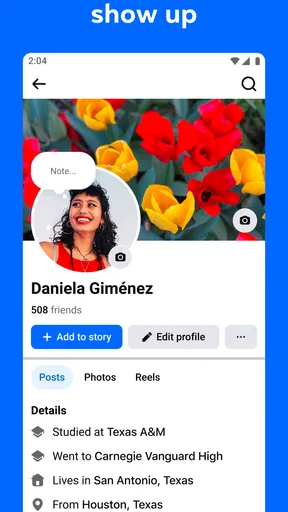
Setting up Facebook was a breeze. I was pleasantly surprised by how intuitive the interface is. Within minutes, I had my profile up and running. The app offers a streamlined way to add personal information, photos, and interests. It's like a one-stop-shop for everything that defines you, digitally speaking.
Connecting with Friends
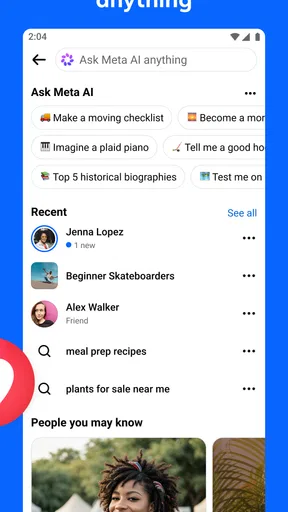
One of the most exciting aspects was reconnecting with old friends. I mean, who doesn’t love a trip down memory lane? Facebook makes it super easy to find people from your past and see what they’re up to now. The "People You May Know" feature feels like a social detective, bringing up familiar faces you might've forgotten about. It's a small world, after all!
News Feed: The Good, The Bad, and The Ugly
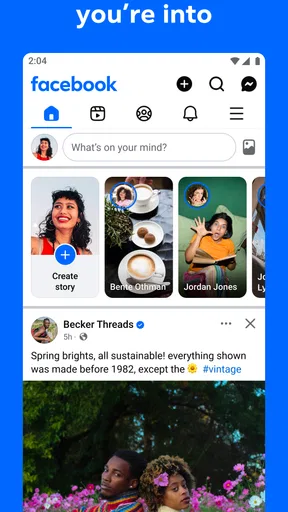
Let’s talk about the News Feed. It’s a mixed bag, really. On one hand, it’s a fantastic way to stay updated with what’s happening around the world and in your friends’ lives. On the other hand, I did find myself mindlessly scrolling through a lot of content that wasn’t particularly relevant to me. But hey, a little digital decluttering never hurt anyone, right?
Groups and Communities
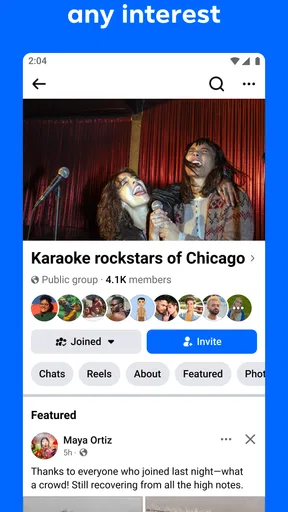
Now, here’s where Facebook truly shines. The Groups feature is a game-changer. Whatever your interest—be it knitting, hiking, or 90s hip-hop—there's a group for that. I joined a few and found them to be vibrant and highly engaging. It's like having a community in your pocket, ready to chat whenever you are.
Privacy Concerns
Of course, no app is without its flaws. Privacy is a biggie with Facebook. The app does offer a variety of privacy settings, but they can be a bit daunting to navigate. It’s crucial to take the time to go through them and adjust according to your comfort level.
Overall, my experience with Facebook has been overwhelmingly positive. It's an excellent platform for staying connected and entertained, but like anything else, it's all about balance. Maybe it's not for everyone, but it was definitely a win for me. So, if you’re still on the fence, give it a shot. You might just find yourself pleasantly surprised.
Privacy and Permissions
See what permissions an app requests and how it handles your data.
- Device & app history
- retrieve running apps
- Identity
- find accounts on the device, add or remove accounts, read your own contact card
- Calendar
- read calendar events plus confidential information, add or modify calendar events and send email to guests without owners' knowledge
- Contacts
- find accounts on the device, read your contacts, modify your contacts
- Location
- approximate location (network-based), precise location (GPS and network-based)
- Phone
- directly call phone numbers, read call log, read phone status and identity
- Photos/Media/Files
- read the contents of your USB storage, modify or delete the contents of your USB storage
- Storage
- read the contents of your USB storage, modify or delete the contents of your USB storage
- Camera
- take pictures and videos
- Microphone
- record audio
- Wi-Fi connection information
- view Wi-Fi connections
- Device ID & call information
- read phone status and identity
- Other
- view network connections, create accounts and set passwords, read battery statistics, pair with Bluetooth devices, access Bluetooth settings, send sticky broadcast, change network connectivity, connect and disconnect from Wi-Fi, full network access, change your audio settings, control Near Field Communication, read sync settings, run at startup, reorder running apps, draw over other apps, control vibration, prevent device from sleeping, toggle sync on and off, install shortcuts, read Google service configuration
How Facebook Compares
Full ComparisonFacebook suits broad friend-and-family connections, Instagram is strongest for creative photo and video sharing, and Threads fits people who want text-led public discussions with fewer ad breaks.
| App | Developer | Rating | Price |
|---|---|---|---|
 FacebookThis App | Meta Platforms, Inc. | 4.6 | Free |
 Instagram | 4.0 | Free | |
 Threads | 4.0 | Free |
Verdict
Strengths of Facebook
- User-friendly interface for easy navigation.
- Wide network to connect with friends globally.
- Robust privacy settings for user control.
- Diverse media sharing options, including videos.
- Accessible on multiple devices seamlessly.
Limitations of Facebook
- Frequent notifications can be overwhelming.
- Privacy concerns due to data collection.
- App can be resource-heavy and slow.
- Algorithm may limit content diversity.
- Ads can be intrusive and frequent.
Other Releases by Meta Platforms, Inc.
View All


Similar Picks in This Category
View All
Instagram4.0

Likee-Live, Chat & Party Games
Likeme Pte. Ltd.4.4

Facebook Lite
Meta Platforms, Inc.4.5

TikTok - Videos, Shop & LIVE
TikTok Pte. Ltd.4.0

Moj: Free Short Drama & Reels
ShareChat4.1

Bigo Live - Live Streaming App
Bigo Technology Pte. Ltd.4.5
You May Also Like
View All


Frequently Asked Questions
What features does the Facebook app offer?
The Facebook app provides a wide range of features, including the ability to post updates, share photos and videos, follow friends and pages, create and join groups, and use Messenger for instant messaging. It also includes features like Facebook Stories, Marketplace for buying and selling items, and the Watch section for video content.
Is the Facebook app free to download and use?
Yes, the Facebook app is free to download on both Android and iOS devices. While the app itself is free, it may contain in-app purchases for certain features. Additionally, using the app requires an internet connection, which may incur data charges depending on your mobile plan.
How does Facebook ensure privacy and security?
Facebook offers several privacy settings to control who can see your information and posts. Users can customize their privacy preferences, manage friend requests, and block or report inappropriate content. Facebook also uses encryption and other security measures to protect user data, but users are encouraged to regularly review their settings for optimal privacy.
Can I use Facebook without a personal account?
To access most features of the Facebook app, you need to create a personal account. However, you can browse certain public pages and content without logging in. A personal account is necessary for interacting with posts, joining groups, and using the Messenger feature for communication.
What should I do if the Facebook app isn't working properly?
If you encounter issues with the Facebook app, try restarting your device, checking for updates, or reinstalling the app. Ensure that your internet connection is stable. If problems persist, visit the Facebook Help Center for troubleshooting tips or to report issues. Regular updates often fix bugs and improve performance.
